



Discover what’s new in the latest release of Axtria DataMAxTM
The Axtria DataMAxTM Summer 2026 release turns routine data work into measurable business advantage — faster decisions, lower operating cost, and stronger governance. By shifting data quality monitoring, rule authoring, batch triage, and large-scale ingestion onto AI agents, your teams reclaim skilled capacity for higher-value analysis, compress time-to-insight, and reduce the operational risk that slows commercial execution.
The result is a data foundation that scales with the business, sustains audit-ready governance, and gets trusted data into decision-makers’ hands sooner.
This release introduces a suite of AI agents that take on the time-intensive work of monitoring data quality, business rule creation, batch triage, and large-scale data ingestion — so your commercial data teams spend less time on configuration and more time acting on insights.
Alongside these agentic capabilities, it also delivers meaningful upgrades to governance, data quality visibility, and pipeline transparency.
This latest release delivers:
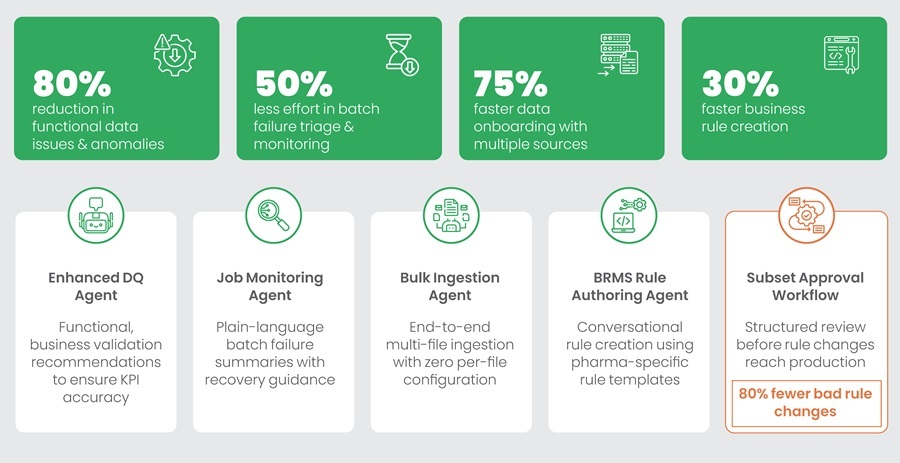
New impact features to deliver commercial intelligence through AI agents
A. Enhanced Data Quality Agent — Advanced Rule Recommendations
Cut DQ rule setup from hours to minutes with AI-driven recommendations
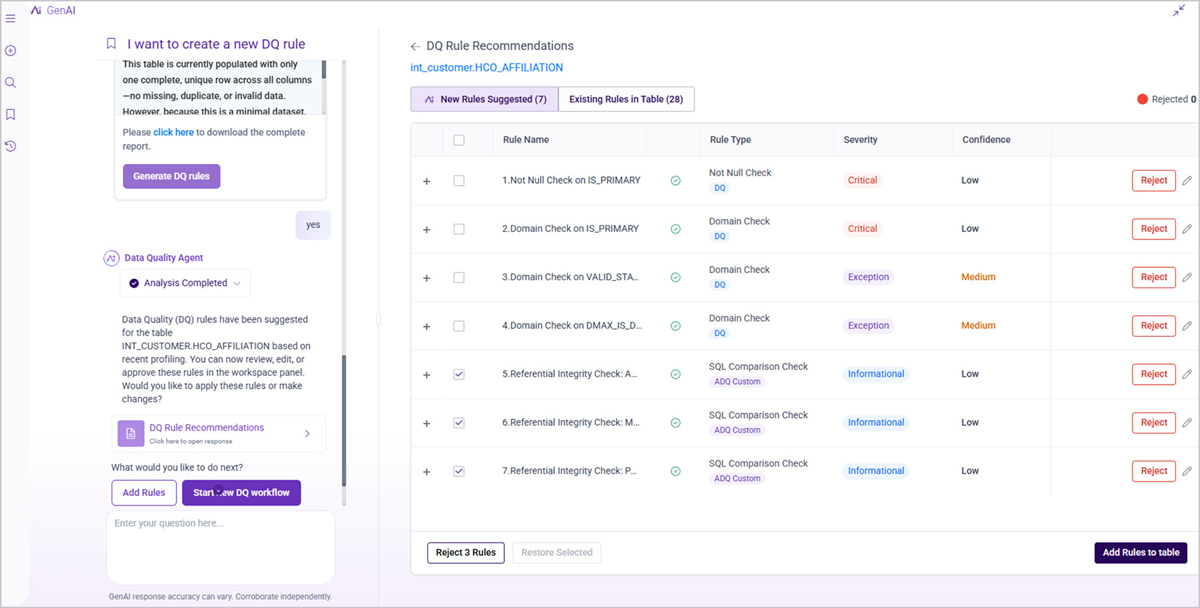
The Data Quality Agent now surfaces Advanced Data Quality (ADQ) rules alongside standard suggestions, using a life sciences semantic knowledge base built on domain expertise, data lineage, and profiling analysis. Beyond structural checks, the agent covers functional data validations that ensure the sanity of critical KPIs, along with proactive detection of anomalies, trend breaks, and processing errors — keeping your data pipelines reliable and business-ready. Your teams can request, review, and activate rules for any table without leaving the agent interface.
- Domain-Aware Rule Quality: Recommendations draw on pharma-specific business glossary terms, data lineage, and profiling history — so suggested rules arrive pre-calibrated for your commercial data, not generic templates.
- Review Without Context-Switching: Your teams evaluate, edit, accept, or reject each suggestion in a single split-screen view, with the reasoning behind every recommendation visible alongside it.
- One-Step Activation: Accept a full set of recommendations or selectively configure individual rules in one action; each approved rule is created immediately under the appropriate Axtria DataMAxTM DQ module.
- Transparent Agent Progress: A real-time status view shows exactly which phase the agent is working through — so your teams always know where a request stands without chasing updates.
- Self-Improving Accuracy: Optional rejection feedback trains the agent over time, narrowing the gap between initial suggestions and what your data teams actually need.
B. Job Monitoring Agent — Intelligent Batch Failure Detection and Recovery Guidance
Resolve batch failures faster without manually reading logs
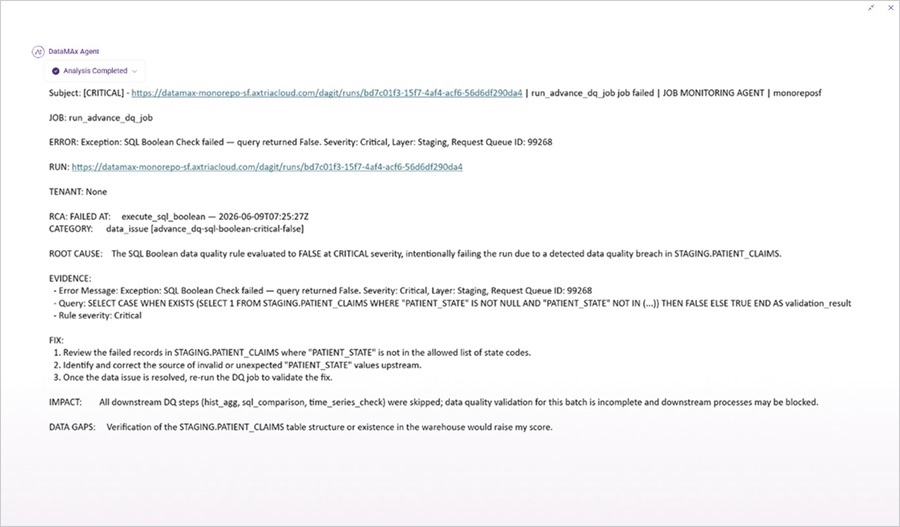
The new Job Monitoring Agent gives your Axtria DataMAxTM Operations teams a clear, plain-language summary of any batch failure — including root cause, downstream impact, and recommended next steps — without tracing job dependencies manually.
- Instant Failure Alerts: Your operations team receives a notification the moment a batch fails — by email and inapplication — with a plain-language summary so they understand the issue before opening a single log.
- Classified Root Causes: Every failure is categorised by type — connection, code, infrastructure, or data — so teams go directly to the right fix rather than working through possibilities.
- SLA Breach Prevention: The agent projects job completion times and raises early warnings when a defined deadline is at risk, giving your team time to act before the breach occurs.
- Anomaly Detection: Job durations are measured against historical baselines, flagging runs that are stuck or running abnormally long before they cascade into downstream failures.
- Smarter Recovery Over Time: The agent accumulates a log of past failures and resolutions, making it progressively easier to distinguish quick retries from issues that require manual intervention.
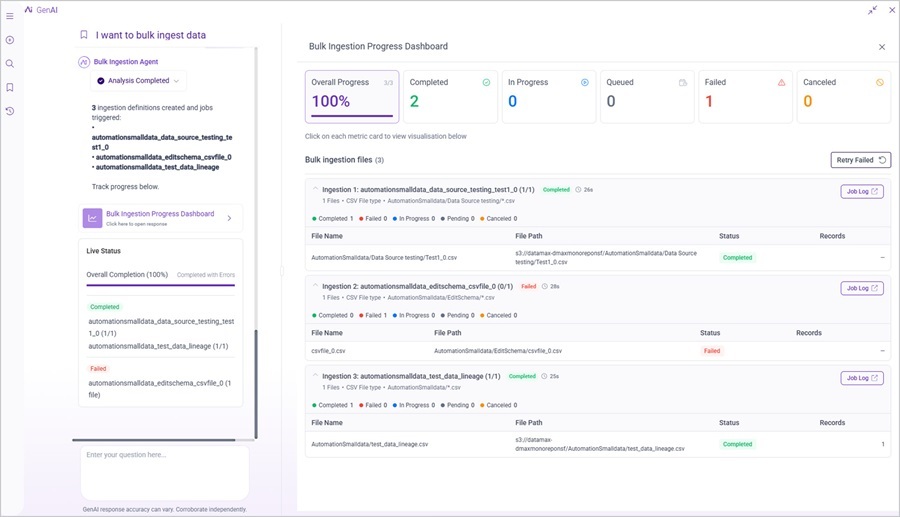
C. Bulk Ingestion Agent — Folder-Based File Discovery and Schema-Aware Parallel Ingestion
Ingest multiple files without configuring each one individually
The Bulk Ingestion Agent now scans selected S3 folders, groups files by schema similarity automatically, and runs multiple ingestion definitions in parallel. Your data engineering teams can move from folder selection to active ingestion significantly faster than the previous per-file workflow.
- Automatic File Grouping: The agent scans your S3 folders, clusters files by schema similarity, and proposes ingestion definition names — eliminating the manual setup that previously scaled linearly with file count.
- Parallel Runs, Isolated Failures: Multiple ingestion definitions execute simultaneously, and a failure in one file does not halt others — your largest file drops complete without the all-or-nothing risk of sequential processing.
- Single Dashboard for All Activity: Monitor every file in real time, filter by status, and access logs for failed items directly, without switching between tools or tracking progress across separate runs.
- Proactive Completion Alerts: Push notifications confirm when a bulk session completes or flag errors on individual definitions, so nothing slips through unnoticed.
- Targeted Retry, Full Audit Trail: Reprocess only the files that failed without rerunning the entire operation, and export a CSV completion report for compliance and record-keeping.
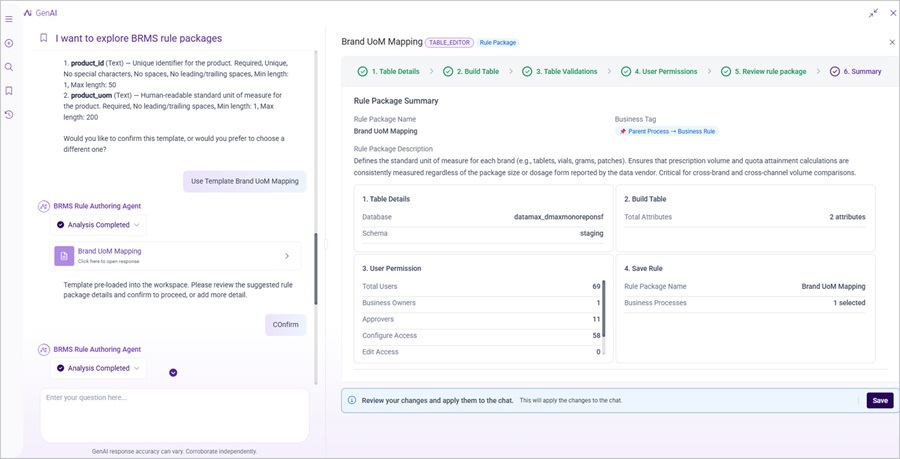
D. BRMS Rule Authoring Agent — Conversational Business Rule Creation and Management
Author new BRMS rules atleast 30% faster through natural language
The BRMS Rule Authoring Agent lets your business analysts create, find, and configure rule packages through conversation, without navigating the full BRMS configuration workflow. The agent searches existing packages for matches, auto-populates configurations from a template library, and enforces all existing access controls throughout.
- Plain-Language Rule Requests: Describe what a rule needs to do in everyday language; the agent finds an existing match or creates a new package — no knowledge of the underlying configuration workflow required.
- Faster Table Editor Rule Creation: For new Table Editor packages, the agent auto-populates table details, attribute definitions, data types, and permissions from a built-in library, reducing authoring time by at least 30%.
- Guided Subset Package Setup: Describe a filtering requirement and the agent selects the right universe table, configures permissions, and applies approval settings — removing the steps most prone to configuration error.
- Ranked Package Discovery: Before creating anything new, the agent surfaces existing packages ranked by relevance — reducing duplicate rule logic and keeping your BRMS library clean across implementations.
- Guardrails BuiltIn: Every rule created through the agent is subject to the same role-based access controls and approval workflows as manual authoring — governance is never bypassed for the sake of speed.
Enhanced features for improving governance, quality, and data transparency
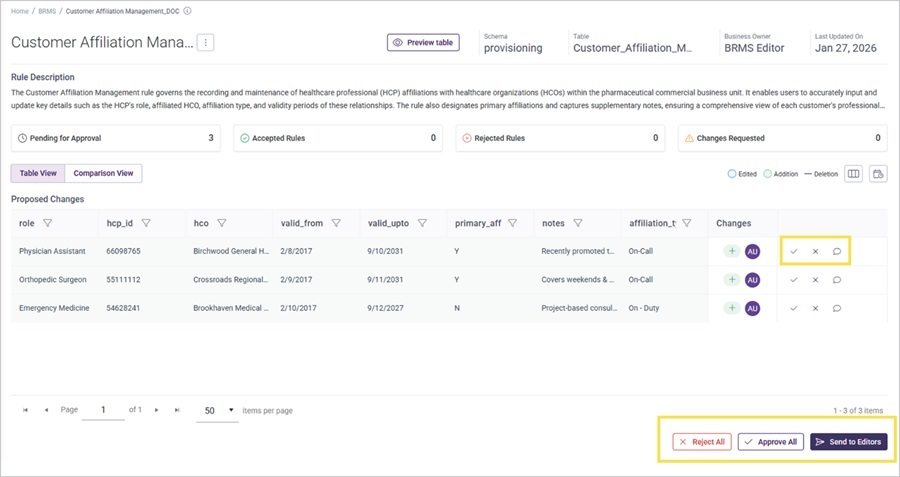
A. Approval Workflow for Subset Rule Packages
Enforce a structured review process before rule changes reach production
Axtria DataMAxTM now includes a dedicated approval workflow for Subset rule packages, matching the approval process already in place for Table Editor. Approvers gain a clear view of exactly what has changed within any rule package before it takes effect, while editors continue working in parallel without bottlenecks.
- Clear Change Visibility for Approvers: A dedicated screen shows exactly what has changed within a rule
- Live Approval Status: Rule packages display a consolidated status that reflects the current state of all rules within them — approvers and editors always have an accurate, up-to-date picture.
- No Productivity Loss During Review: Only the rules pending approval are locked; the rest of the package remains fully editable, keeping your teams moving while governance works in parallel. package, so approvers make decisions based on substance rather than decoding diffs.
- Automated Notifications at Every Stage: Approvers and editors receive email alerts when changes are submitted and when decisions are made, closing the communication gap that slows manual review cycles.
B. Data Quality Rules Management Page
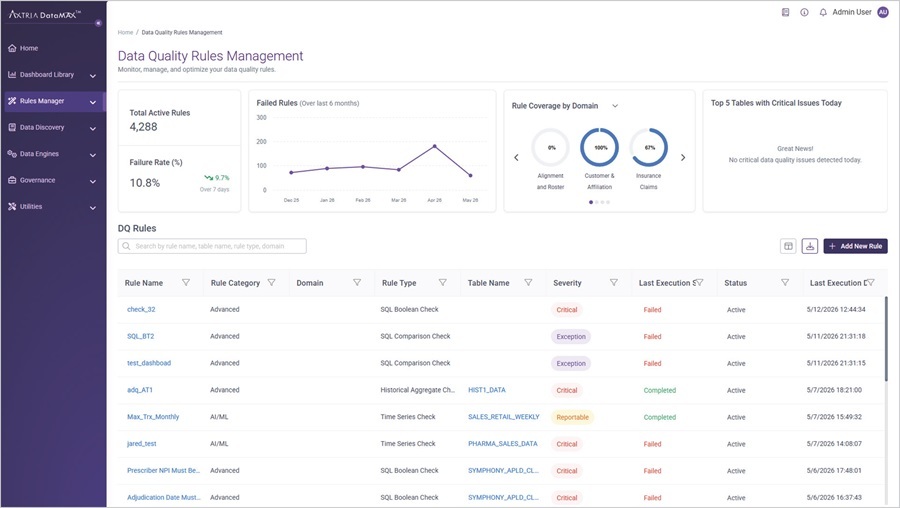
Manage all active DQ rules from one consolidated view
The new Data Quality Rules Management page brings standard, auto-generated, advanced, and custom rules into a single searchable interface with KPI cards surfacing health at a glance. Critical failures requiring immediate attention are highlighted at the top of the view, so your teams prioritise remediation without hunting for problems.
- Every Rule Type in One Place: Standard, auto-generated, advanced, and custom rules are unified in a single interface — your teams stop navigating between modules to get a complete picture of data quality coverage.
- Find Any Rule in Seconds: Filter and search by rule type, status, domain, or table name across your full rules library, making it practical to investigate and act on issues at scale.
- Create Rules Without Leaving the Page: Add a new DQ rule of any type directly from the management view — one fewer navigation step each time a gap is identified.
- Critical Failures Front and Centre: The five tables with the highest critical-severity failure counts today are highlighted at the top of the view, so remediation effort goes where it matters most.
C. Revamped In-House Lineage Engine
Trace your data from source to target across the full depth of your pipelines
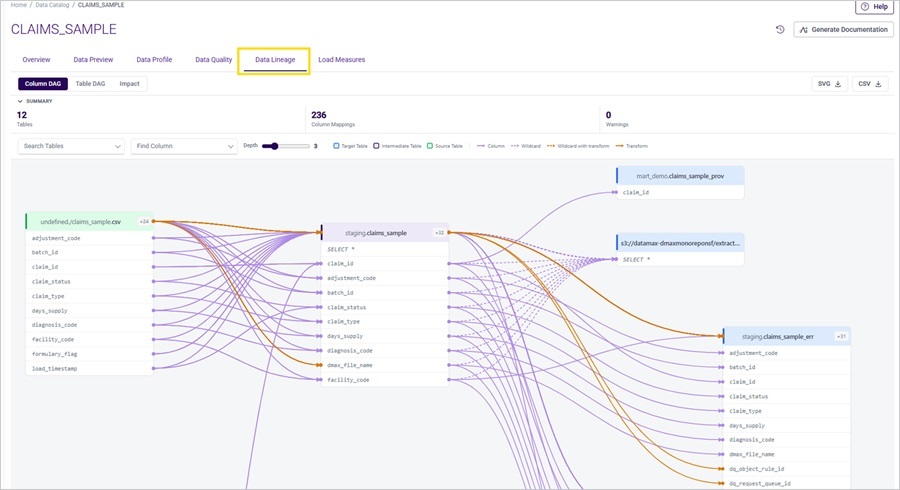
Data Lineage is rebuilt on an in-house SQL-parsing engine, removing the previous single-level restriction that made it impossible to see the full flow through complex pipelines. Your teams now have end-to-end visibility across every intermediate table, regardless of pipeline depth, with lineage rendering in under five seconds.
- Complete Pipeline Visibility: Trace any table forward and backward through every upstream and downstream dependency — across Data Catalog, Processing Pipelines, BRMS, and Auto Documentation — with no depth limit
- Fast Enough for Daily Use: Lineage renders in under five seconds, making impact analysis a routine step before changes rather than an occasional investigation reserved for major incidents.
- Pre-Change Impact Assessment: Select any table to see which upstream sources and downstream consumers would be affected by a modification, with adjustable depth so your team scopes the analysis to what matters.
- Flexible Access and Export: Export lineage diagrams in SVG or CSV for documentation and audit purposes; administrators can toggle between the new engine and the legacy view instantly without disrupting live workflows.
D. Additional Platform Enhancements
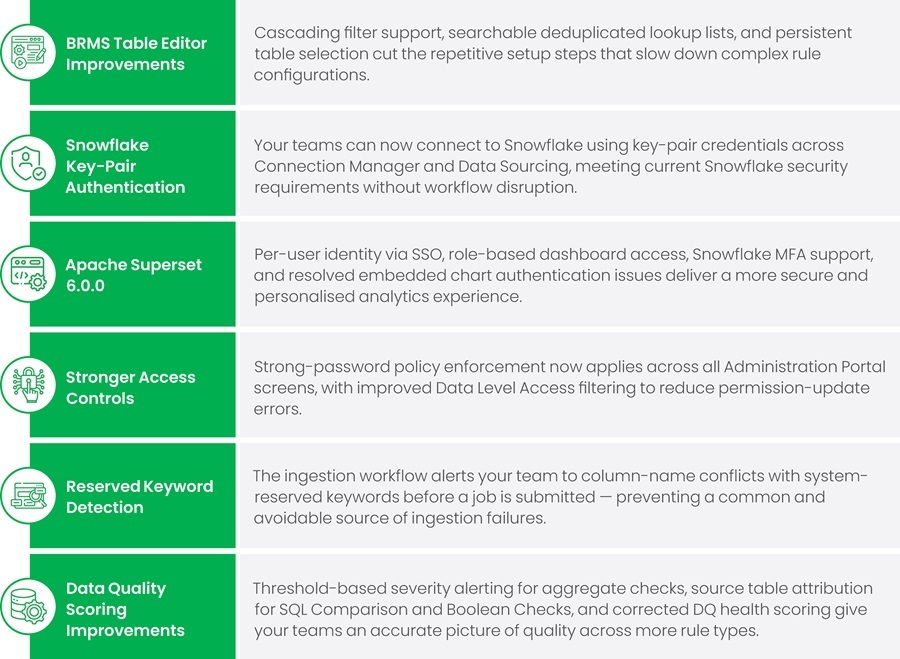
This release also delivers operational and security improvements across the platform: