




Axtria announces the Winter 2026 release of Axtria DataMAx™, delivering targeted enhancements designed to strengthen enterprise data governance, accelerate AI readiness, and improve the reliability and speed of decisionmaking across the organization.
This release leverages agentic AI to simplify data integration, enforce governance at scale, and streamline user interactions across the data lifecycle. The result is more consistent data operations, improved data quality, greater transparency into third-party and vendor data, and stronger end-to-end control for IT and data leadership teams.
Our latest AI agents support data ingestion, data quality, and ETL within clearly defined policies and controls, ensuring predictability, traceability, and compliance as automation scales. At the core of these new AI capabilities is a strengthened Business Rules Management System (BRMS) that provides the explicit logic, controls, and auditability required for trusted automation. This foundation allows AI agents to operate with consistency and accountability— even as data flows, processes, and business conditions evolve.
These capabilities enable tighter collaboration between enterprise IT, data stewards, and business owners while reducing operational friction across onboarding, vendor data management, and data quality processes. The outcome is a more resilient, governed data platform that supports secure automation, lowers operational risk, and enables AI to be deployed confidently in production environments.
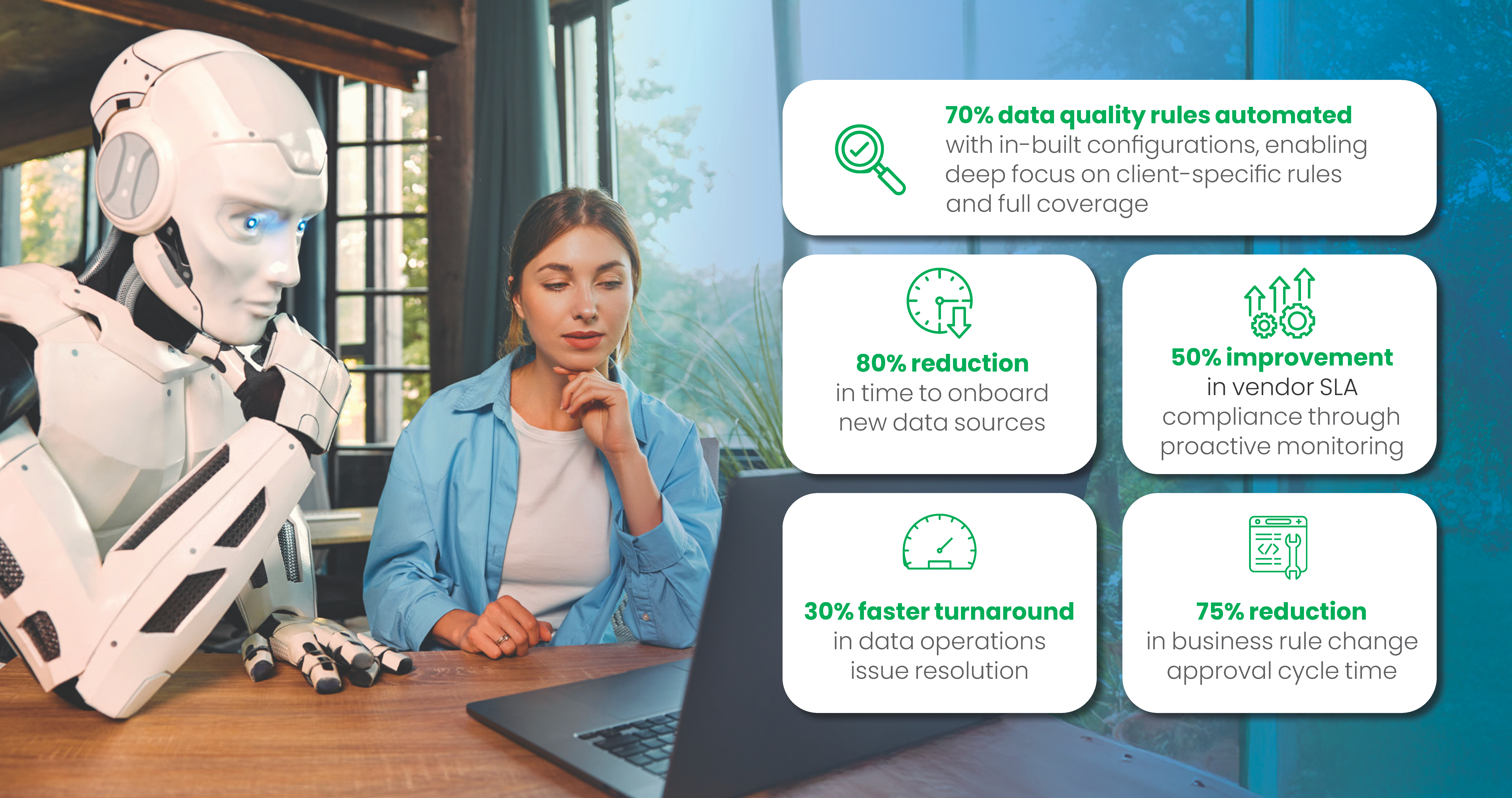
What is new in this release?
Future ready Agentic AI capabilities that boost data onboarding, improve quality and simplify data understanding
AI-Powered Data Onboarding Agent
Who is it for? Implementation Team, Data Engineer, Admin User, and Data Steward.
Axtria DataMAxTM introduces an AI-powered onboarding agent that lets users onboard new data sources and set up data pipelines using natural language conversations, removing complex technical steps for more efficient and accessible data integration.
- The AI-powered onboarding agent streamlines onboarding new data sources through natural language setup and automated job creation making integration fast and accessible to all users.
- Human-in-the-loop clarification ensures correct configurations, reduces reliance on technical teams, and empowers business users to connect data quickly and at lower costs.
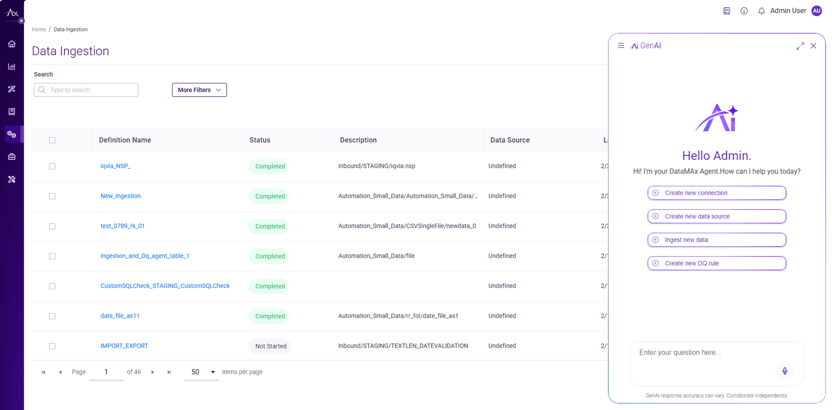
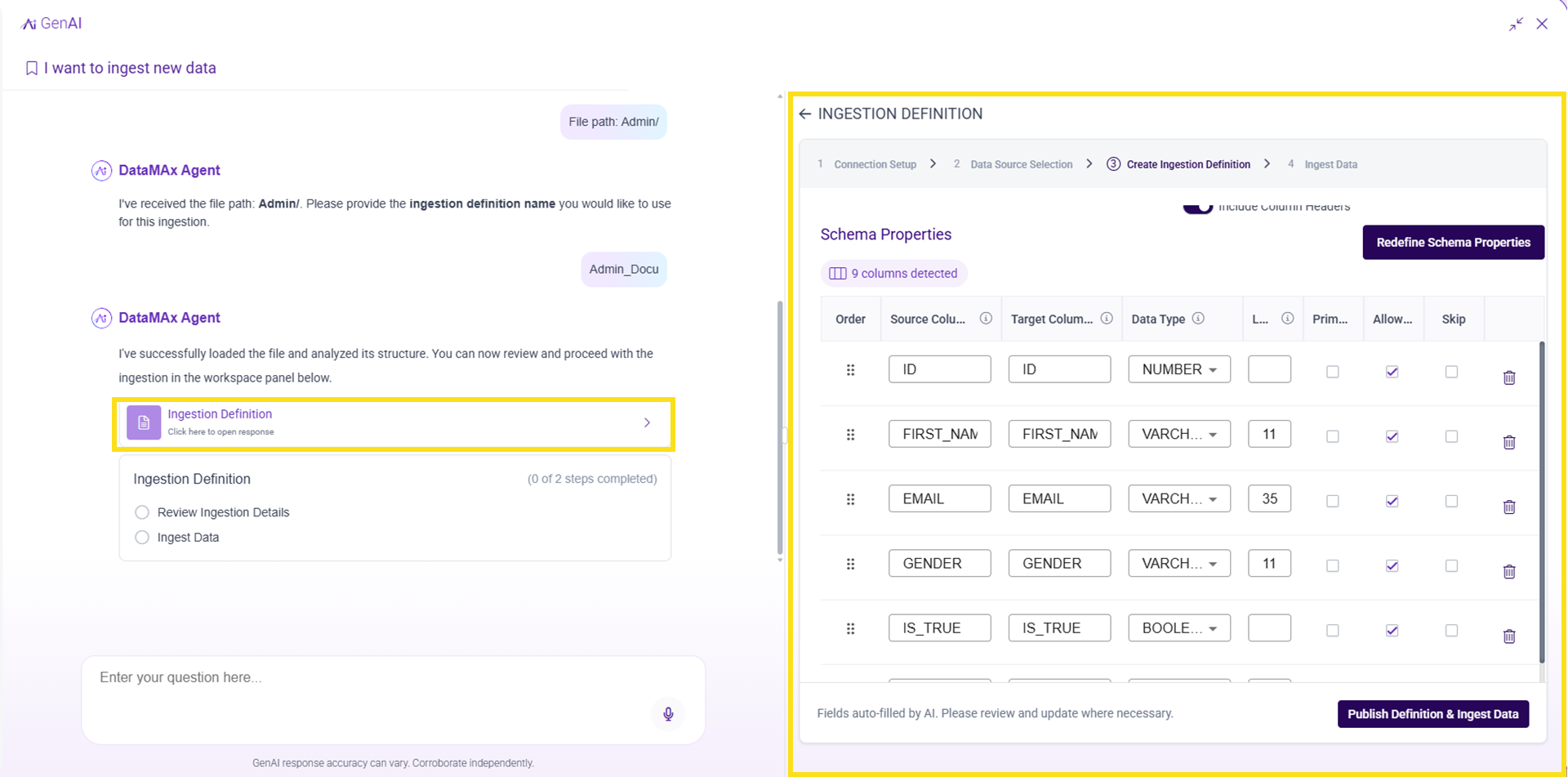
Figure 1: AI-Powered Data Onboarding Agent.
AI-Powered Data Quality Agent - Rule Recommendations and Execution
Who is it for? Data Steward, Business User, and Data Quality Managers.
The Data Quality Agent uses smart rule recommendations based on metadata, profiling, industry expertise, and data dictionaries to suggest relevant column-level checks. Users can efficiently review and adjust these rules through a conversational interface, enabling faster, broader data quality coverage.
- Generates insights based on profiling of the data
- Maps columns to industry glossary terms for standard validations (email, phone, dates).
- Automates validation suggestions using table structure, data types, and business context.
- Suggests rules based on insights like null rates and uniqueness patterns.
- Allows bulk or individual review and updates before implementation.
- Instantly monitors accepted rules to ensure baseline data quality.
This feature embeds deep life sciences domain intelligence to deliver proactive, scalable, and audit-ready data quality governance.
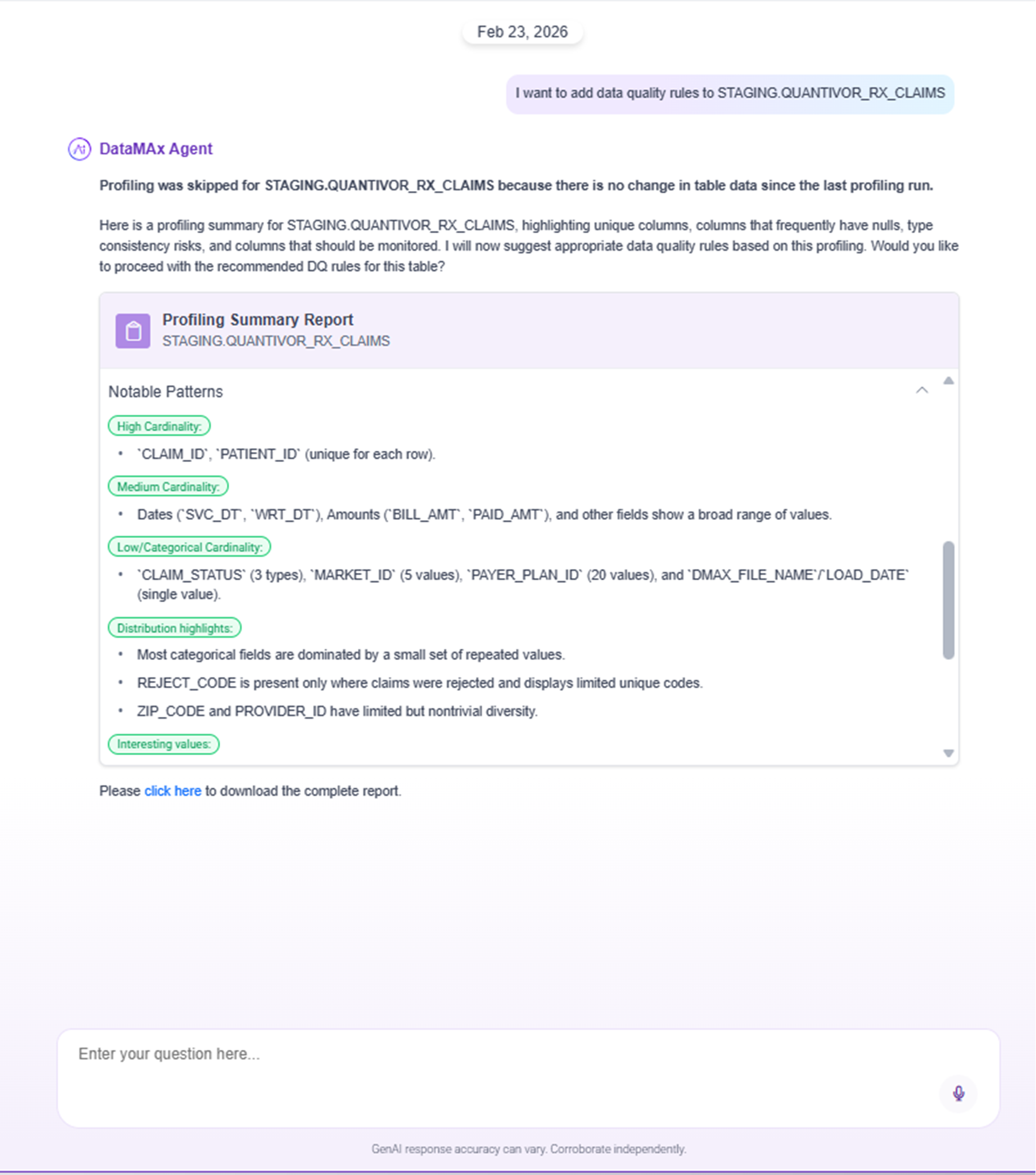
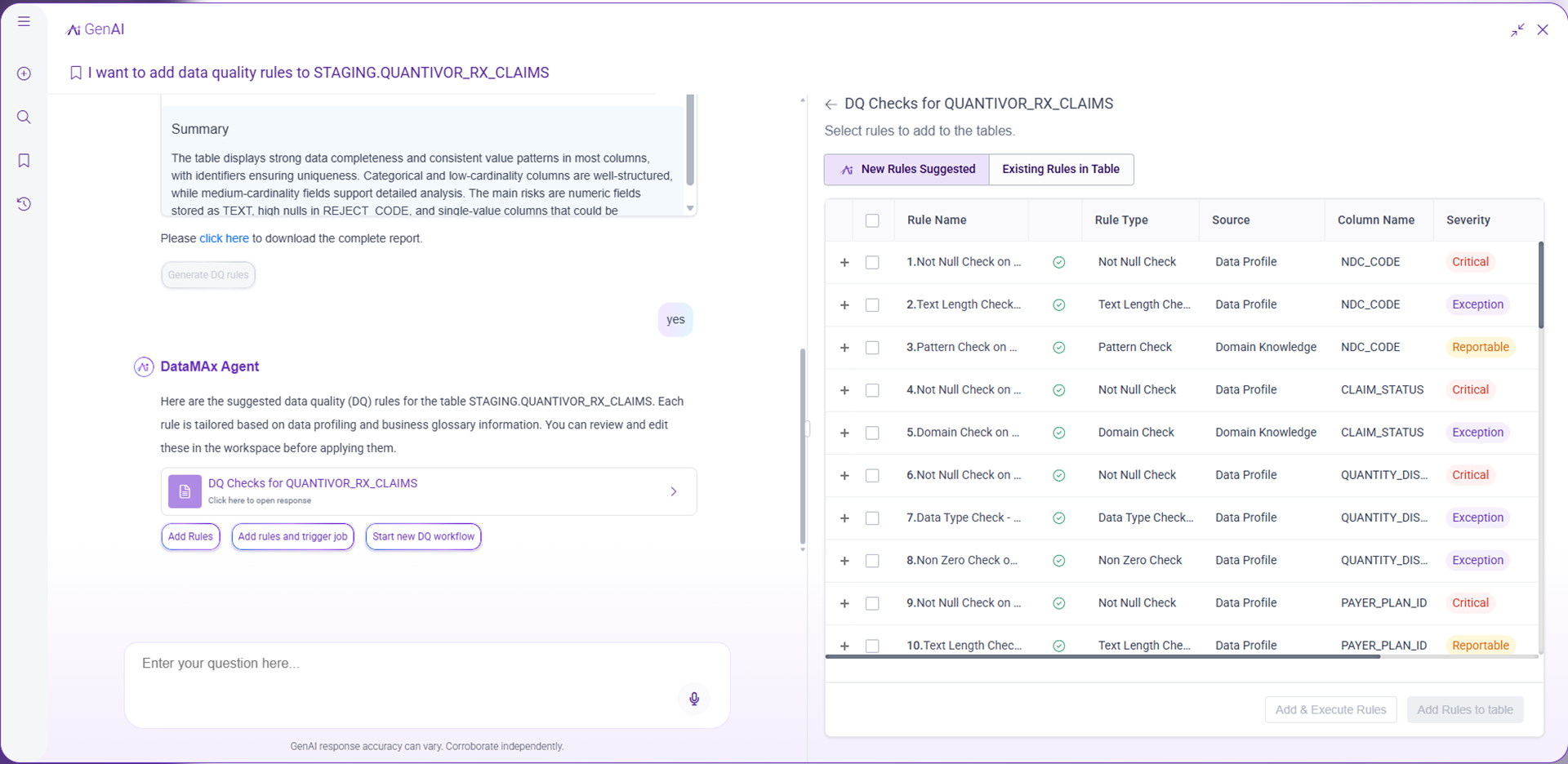
Figure 2: AI-Powered Data Quality Agent - Rule Recommendations and Execution.
Unified dashboards delivering real-time visibility, historical insight, and transparent approvals to improve operational efficiency
Operations Dashboards
Who is it for? Operations Analyst, Operations Manager, Data Steward, Administrators and Functional/Business IT
a. Real time dashboard -
This functionality facilitates data-driven optimization by pinpointing bottlenecks and identifying areas for improvement, thereby supporting more accurate capacity forecasting and robust cost justification for infrastructure investments. It enables continuous enhancement through systematic performance tracking and equips executive leadership with clear, timely operational health insights and early detection of performance degradation to support proactive risk mitigation.
- Live Batch Tracker:See today’s batches and separate runs, with performance tracked for each.
- Filter by Batch Status: Instantly view batches by status, such as In Progress.
- Expand batch view to flow level: Expand or collapse to see batch or flow details.
- View historical batch run counts: Check how many scheduled runs were completed over time.
- Track live batch progress with Gantt chart: Visualize batch status, timing, and progress.
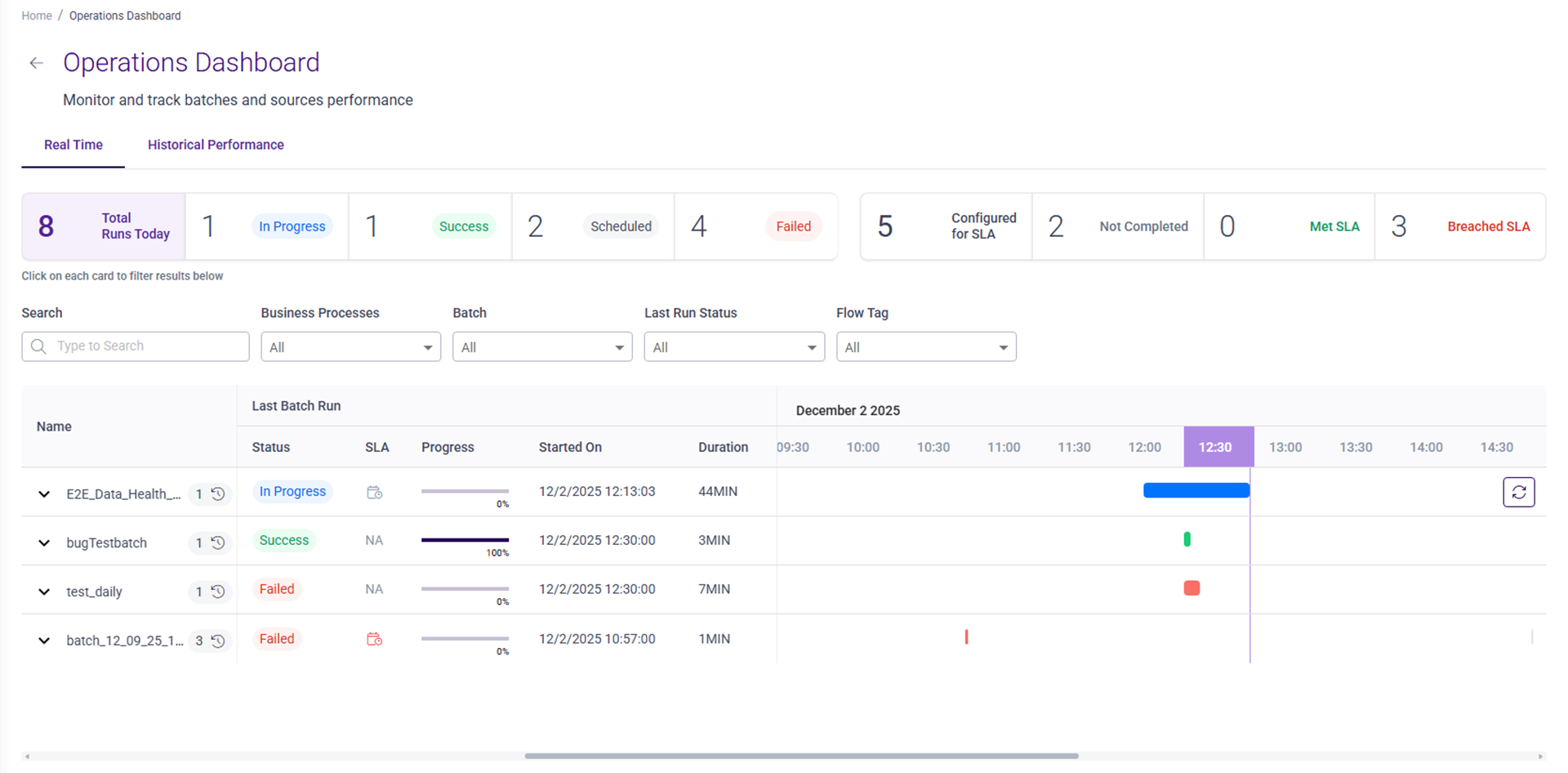
Figure 3: Operations Dashboard - Real Time.
b. Historical Performance:
This tool enables users to monitor and track batch and source performance for over a period of time. By offering a centralized source of information, it streamlines operations and minimizes monitoring workload, leading to quicker issue diagnosis, faster resolution, and improved resource allocation. As a result, it reduces data pipeline downtime and helps maintain SLA commitments through proactive monitoring and early detection of problems.
- Trend Analysis: Displays past SLA compliance, data quality, and processing times over set periods.
- Comparative Analytics: Compares batch performance to identify strengths and recurring issues.
- Executive Reporting: Summarizes performance with snapshots, growth/decline rates, and recommendations.
- Threshold Alerts: Notifies when batch metrics exceed set thresholds or show sudden changes.
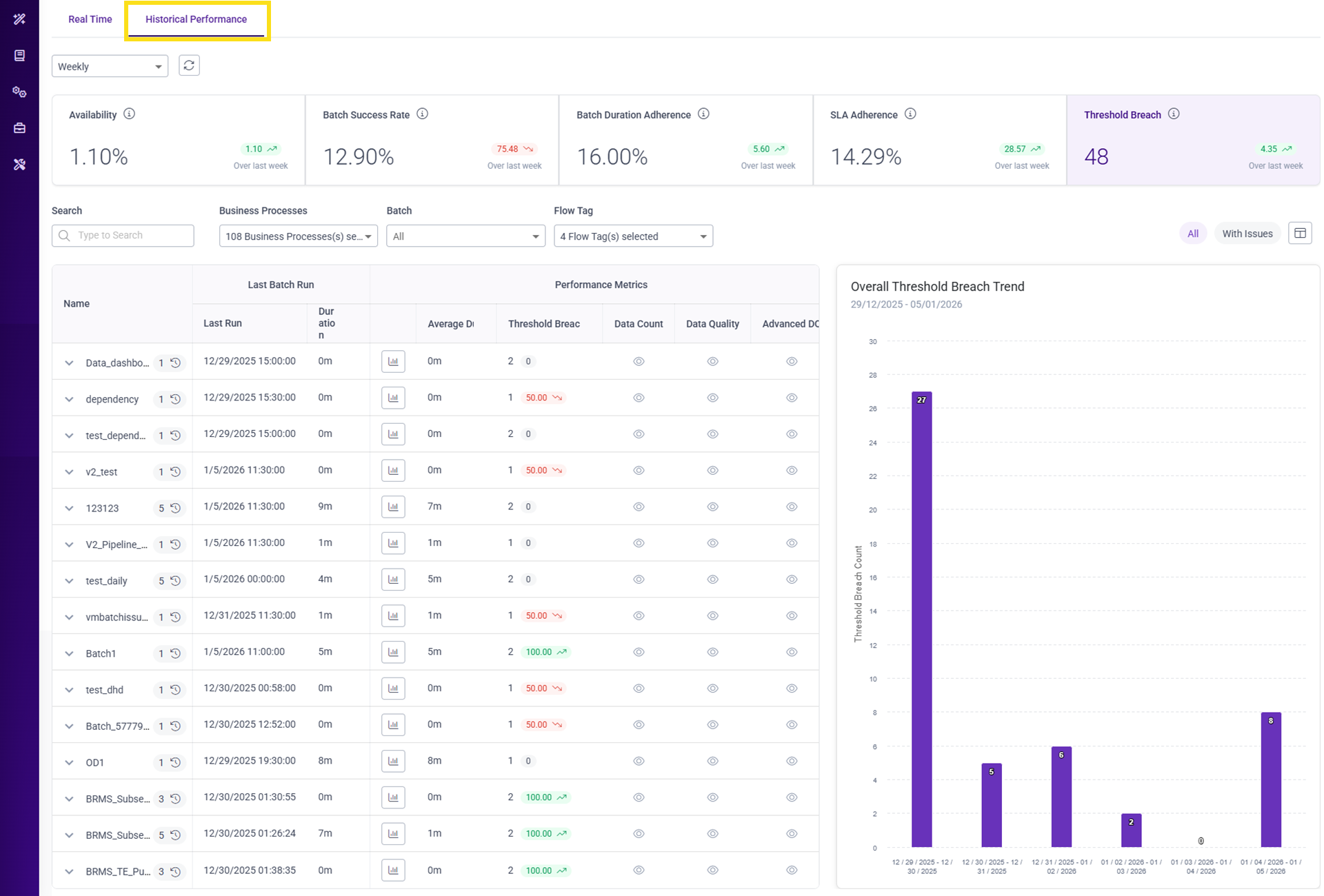
Figure 4: Operations Dashboard - Historical Performance
c. Vendor Management - Performance Dashboard
Who is it for? Operations Analyst, Operations Manager, Vendor Manager, and Data Steward.
A vendor performance monitoring framework offers real-time insights into SLA compliance, data quality, and issue resolution for proactive management and risk mitigation.
Also, vendor scorecards deliver integrated assessments across vendors, sources, and files, supporting informed decisions and performance improvement.
- Multi-level tracking: Monitor vendor health at vendor, source, and file levels with root cause analysis.
- SLA monitoring: Track delivery timeliness, integrity, and data quality to ensure data provider accountability.
- Issue management: Review open/closed issues and resolution times to flag vendors needing immediate action.
- Health indicators: Classify vendors as Healthy, Warning, or Critical based on set metrics.
- Configurable thresholds: Define limits and receive alerts for metric deviations.
- Drill-through navigation: Move from summary views to detailed source analysis for in-depth performance review.
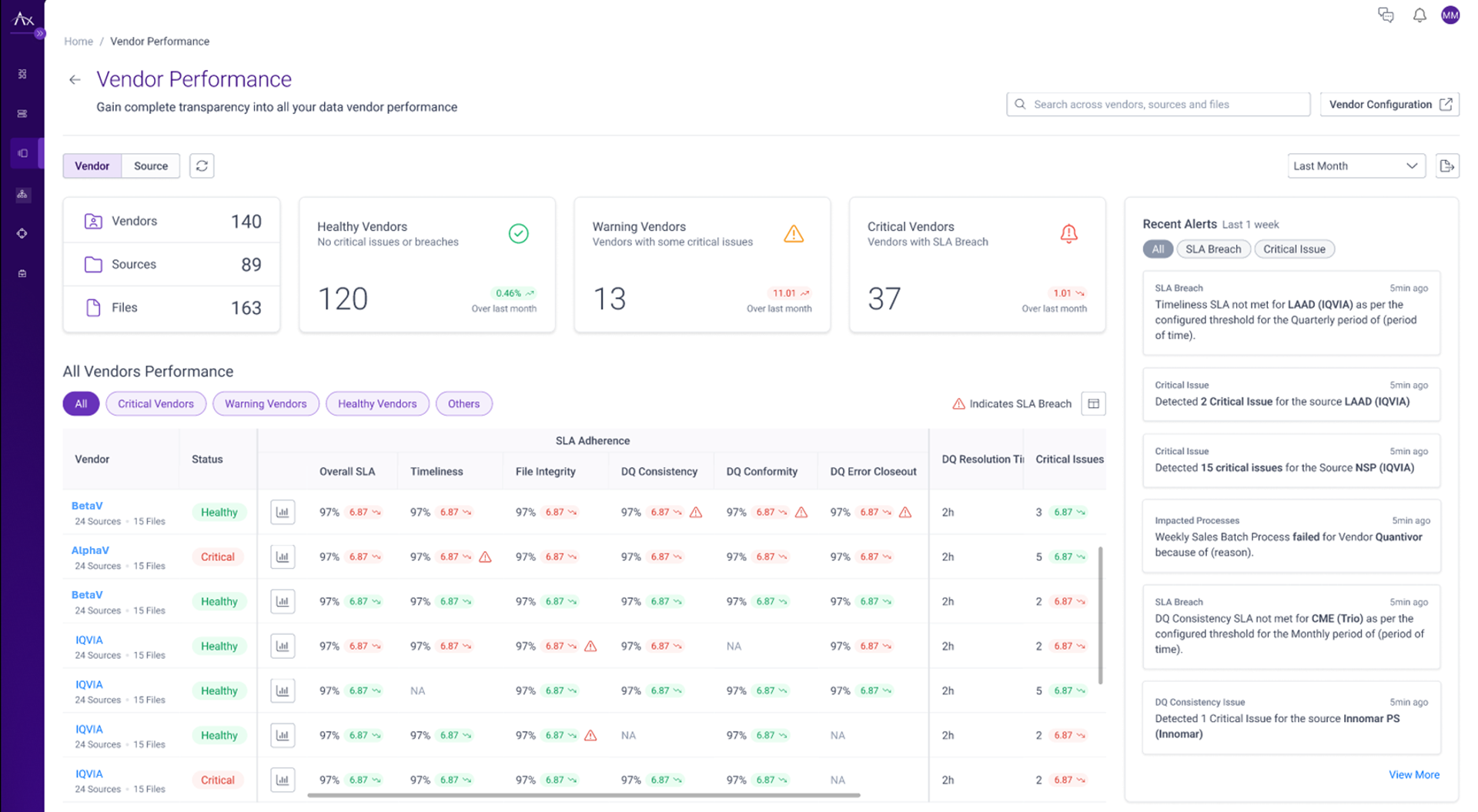
Figure 5 (a): Vendor Management - Performance Dashboard
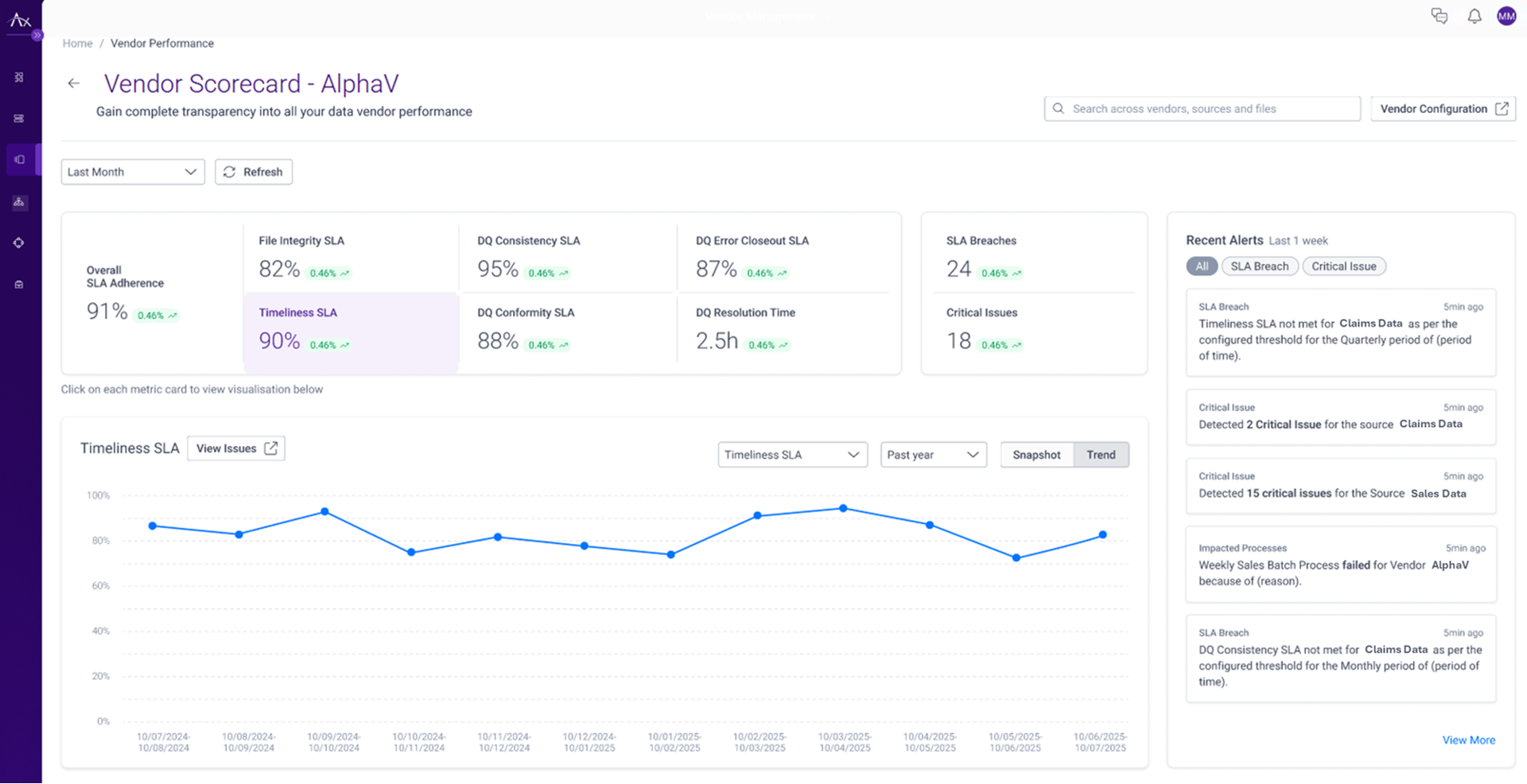
Figure 5 (b): Vendor Management – Vendor Scorecards
Rich Data Quality with Industry-Focused Templates and UI-Based Anomaly Detection
a. Advanced Data Quality - Domain-Based Rule Templates:
Who is it for? Data Steward, Data Quality Manager, Business User, and Data Engineer.
This release contains industry-specific data quality rule templates that speed up implementation across major life sciences commercial analytics domains — including Sales, Claims, Customer, Alignment, and Interactions and many more, for ensuring domain best practices and knowledge for checks and compliances.
- Industry Templates: Deliver domain-specific validation rules for common life sciences analytics areas like Sales, Claims, Customer, Alignment, and Interactions.
- Streamlined Implementation: Minimize data quality setup by applying established validation frameworks for relevant domain tables.
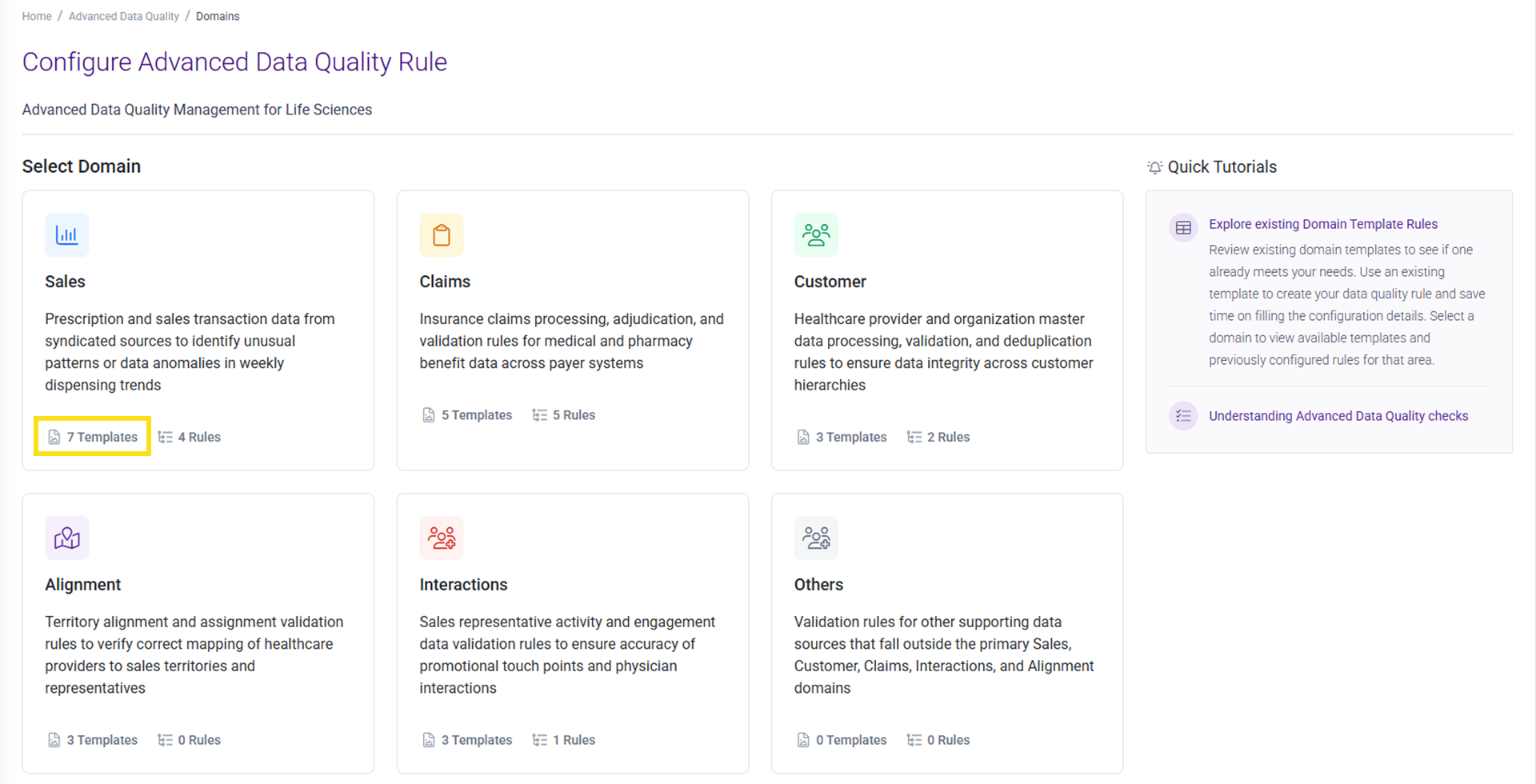
Figure 6: Advanced Data Quality - Domain-Based Rule Templates
b. Advanced Data Quality - Time Series Anomaly Detection:
Who is it for? Data Steward, Data Quality Manager, Operations Analyst, and Business Analyst.
UI-based time series anomaly detection uses an out-of-the-box AI/ML based model to spot unusual patterns and outliers, giving early alerts for data quality or operational issues. It makes machine learning checks accessible for all, without needing technical expertise.
- Find major anomalies in metrics using adjustable statistical models.
- Set up rules easily through a user-friendly interface, no data science skills needed.
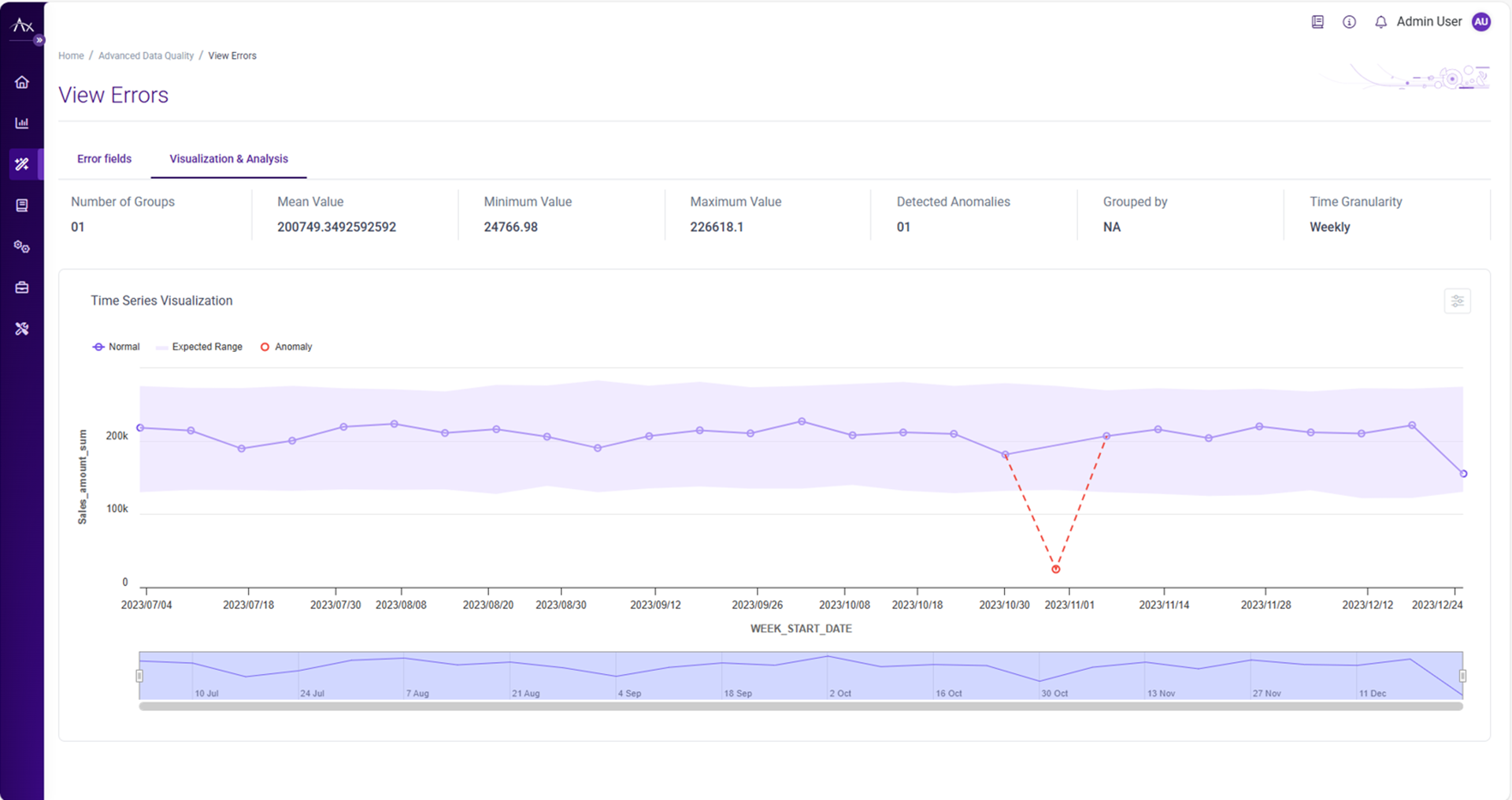
Figure 7: Advanced Data Quality - Time Series Anomaly Detection
Business Rules Management System with streamlined approvals for clear visibility and control
a. BRMS Table Editor - Enhanced Approval Workflow
Who is it for? Business User, Rule Editor, Rule Approver, and Compliance Manager.
The BRMS Table Editor approval workflow now offers clearer status indicators and reviewer feedback, making reviews faster and reducing unnecessary communication. Formal approval processes with audit trails ensure compliance and prevent unapproved rules from being published.
- Editors get detailed email notifications after reviews, including approver info, decisions, and direct links.
- Rules show clear status labels (Approved, Rejected, Changes Requested) with color coding and comments.
- The Publish button is only enabled after all approvals; any unapproved changes revert to “Send for Review.”
- Approved rules are locked; others remain editable with visible feedback.
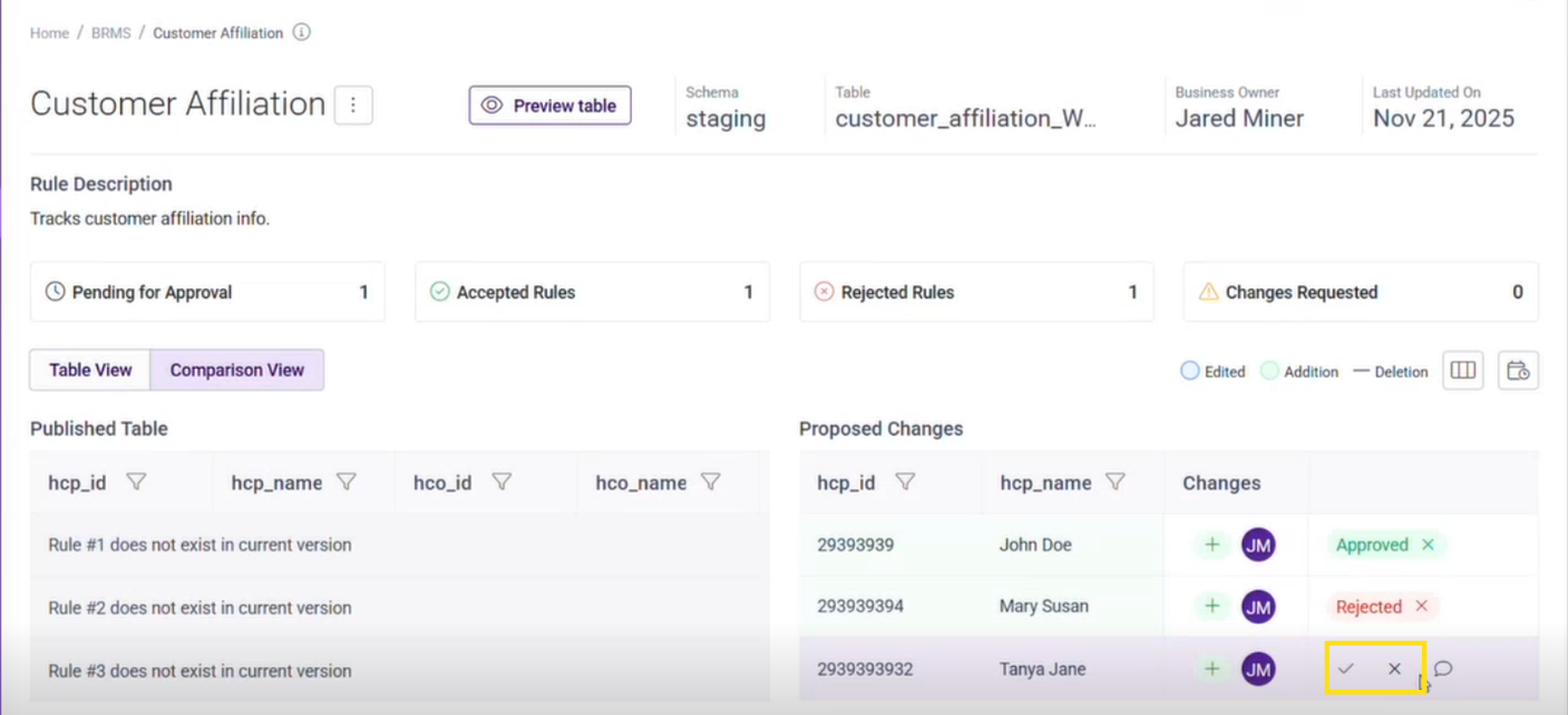
Figure 8: BRMS Table Editor - Enhanced Approval Workflow
What has improved in this release?
Enhanced features for improving discovery, visualizations and better monitoring and analysis, as well as flexibility for easy configuration.
a. Advanced Data Quality Rule Management & Intelligence: The Data Quality (DQ) module now offers smarter, more scalable, and user-friendly rule management features.
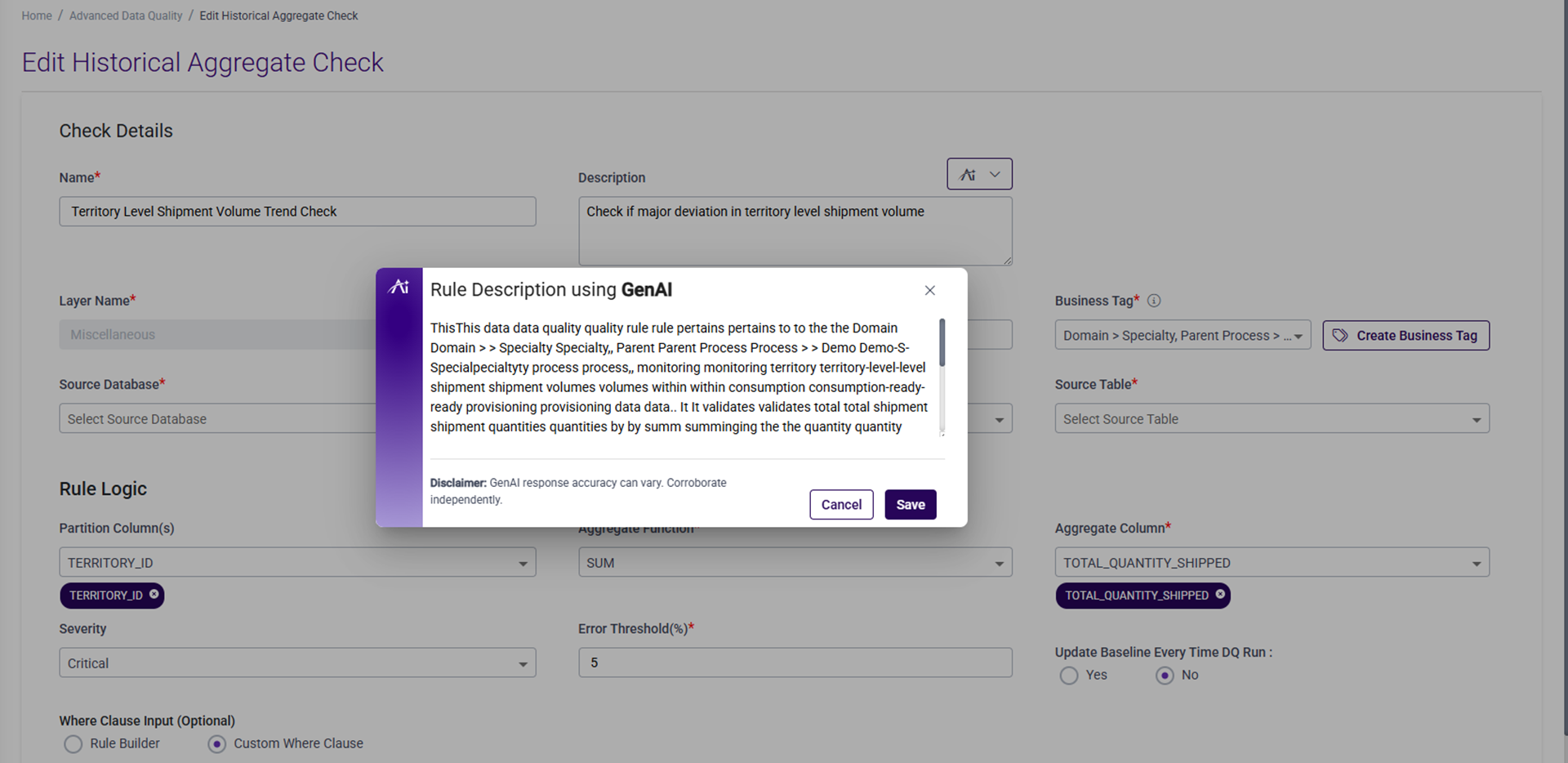
- GenAI based DQ rules description: Axtria DataMAxTM now leverages GenAI to automatically create meaningful, business-ready descriptions for your Advanced Data Quality rules. When configuring any of the Advanced Data Quality checks, simply click the AI icon—and within seconds, the system intelligently analyzes your rule configuration - table, metrics, aggregation logic etc. and generates a clear, contextual description that accurately captures the rule’s intent and validation logic.
- Better Visualization and analysis: You can now configure custom dashboard URLs when creating SQL Comparison, Historical Aggregate rules, or External Functions, letting you launch visual insights and metrics through third-party dashboards.
- Enhanced Discoverability: New business tagging and filtering options are available on Advanced Data Quality rules and External Functions pages. Users can filter rules by Parent and Child business processes, with filters updating automatically as new processes are added—making navigation and rule discovery much easier.
- Improved error identification and configurability: Detailed error tables and threshold-based severity controls.
- Enhanced List Views: The Advanced DQ list page now shows the domain, last execution date, and status of each rule, with new filters by domain.
b. External Functions have been enhanced for better organization and classification:
- You can assign multiple business tags with key-value pairs, and both category and tag information appear as columns filter on the home page for better organization and classification.
- Category dropdown menus have been added for better filtering on Data Quality, BRMS, Data Sourcing, Data Processing Pipelines, Provisioning, and Others.
c. Unique Data Quality Rule Identification: The product now requires naming every data quality rule and the system suggests names for single-column rule types, though users can trigger the change themselves. Duplicate rule names are not allowed, and there is support for older rules with duplicate names based on severity and conditions.
Axtria DataMAxTM Business Rules Management System (BRMS)
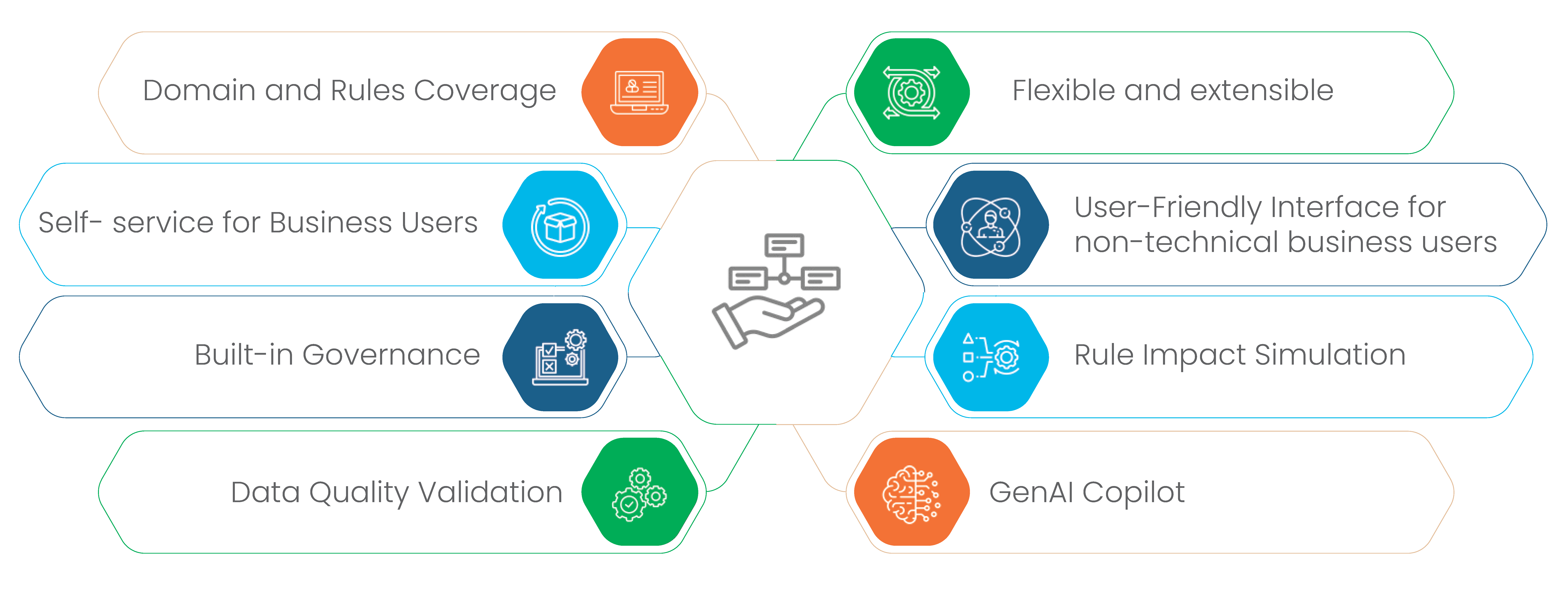
Empower your business users with confident, scalable AI and data backed decisions - boosting transparency and driving operational success across your teams.
A seamless, out-of-the-box module within Axtria DataMAxTM that fits into your existing architecture along with leading platforms like Databricks and Snowflake, enabling safe, scalable, and consistent Agentic AI driven data operations.
Its explicit governance and auditable logic empower trusted decision-making, adding immediate value without any disruption or need to re-architect your data stack.
Why this matters -
- BRMS automates complex decision logic, allowing AI agents to act autonomously and consistently based on transparent, pre-defined business rules.
- It enables dynamic adaptation as rules can be updated in real time, empowering agents to respond swiftly to changing business needs and data scenarios.
- The module also ensures accountability and trust by providing auditable, explainable rule execution, which is critical for reliable AI-driven data management.
- Lastly, it facilitates collaboration between business and technical teams, making rule creation and governance accessible for both, and supporting scalable agentic workflows.
Interested in knowing more?
Click here to know more on Axtria’s DataMAxTM and its unique capabilities to help you move from data to insights, to decisions.